どの流入元が売上を生んだのか。その根拠まで分かります。

Tally は、根拠まで見せる収益アナリティクスです。Stripe、Paddle、Lemon Squeezy、Polar、WooCommerce、Squarespace の売上を 1 件ずつ、購入者を連れてきた訪問に紐づけ、すべての売上にレシートを付けます。根拠、紐づけた方法、その確度です。WooCommerce や Squarespace のストアはワンクリックで接続でき、そのほかの決済サービスは Payments API に売上を送信できます。

14 日間無料、カード登録は不要です。

例
  1. Googlegoogle.comRedditreddit.com/r/SaaSChatGPTchatgpt.comNewsletterutm_medium=emailx.comt.co
  2. /pricing を閲覧アメリカ合衆国Austin · iOS の Safari /blog/stripe-fees を閲覧ドイツBerlin · Linux の Firefox /compare を閲覧カナダToronto · macOS の Chrome / を閲覧イギリスLeeds · Windows の Edge /launch を閲覧オランダUtrecht · Android の Chrome
  3. $49.00 の売上Google に帰属 $120.00 の売上Reddit に帰属 $49.00 の売上ChatGPT に帰属 $19.00 の売上Newsletter に帰属 $79.00 の売上x.com に帰属
yoursite.comサンプルデータ

Revenue

$1,636

28%vs the 7 days before

after $39 in refunds and chargebacks

Conversion

1.0%

5%vs the 7 days before

Revenue per visitor

$0.52

No changevs the 7 days before

Linked to a visitor

85%

6 payments, $234 not linked. See what to fix

Visitors

3,174

29%vs the 7 days before

Pageviews

8,306

29%vs the 7 days before

Engaged time per visit

46s

11%vs the 7 days before

Live now

4

visitors in the last 5 minutes

Visitors and revenue

  • Visitors
  • Revenue
  1. GoogleOrganic Search976$312
  2. Direct718$301
  3. x.comOrganic Social398$268
  4. RedditOrganic Social241$115
  5. ChatGPTAI Assistants235$175
  6. Hacker NewsOrganic Social184$83
  7. NewsletterEmail131$94
  8. PerplexityAI Assistants78$57

Pages

  1. /2,054$822
  2. /pricing1,129$299
  3. /blog/stripe-fees564$94
  4. /docs361$38
  5. /compare302$29
  6. /changelog184$67
  7. /blog/launch-week164$20
  8. /signup125$38

A page's revenue is what visitors who viewed it paid afterwards in this period. One sale counts on every page its buyer saw, so the column adds up to more than the total.

Countries

  1. United States1,111$414
  2. Germany342$273
  3. United Kingdom299$292
  4. India211$219
  5. Canada168$72
  6. France123$38
  7. Netherlands98$35
  8. Brazil94$63

Devices

  1. Desktop2,155$860
  2. Mobile1,129$505
  3. Tablet100$42

What Direct was

Last 7 days · 855 visitors with no referrer

Visits that came with no referrer, and our best reading of each: a guess from the page they landed on, the device and the browser, not a certainty.

Our best reading

Typed or bookmarked

416 visitors · 49% of Direct

Someone typed your address or opened a bookmark: people who already know where to find you.

How we read it: No referrer, a landing on your home page or a one-part path such as /pricing, on a desktop.

Our best reading

Back from checkout

79 visitors · 9% of Direct

A buyer coming back from the payment page in a new visit. They were already here; this visit isn't a new arrival.

How we read it: A payment provider as the referrer, or a landing on a checkout success address, at the start of a visit.

Our best reading

Instagram in-app browser

65 visitors · 8% of Direct

Opened inside Instagram's own browser, which keeps the post or profile the link was in to itself.

How we read it: Instagram's mark in the browser's user agent, and no referrer. Sources count these visits under Instagram, Organic Social.

Our best reading

TikTok in-app browser

36 visitors · 4% of Direct

Opened inside TikTok's own browser, which keeps the post or profile the link was in to itself.

How we read it: TikTok's mark in the browser's user agent, and no referrer. Sources count these visits under TikTok, Organic Social.

Our best reading

LinkedIn in-app browser

22 visitors · 3% of Direct

Opened inside LinkedIn's own browser, which keeps the post or profile the link was in to itself.

How we read it: LinkedIn's mark in the browser's user agent, and no referrer. Sources count these visits under LinkedIn, Organic Social.

Our best reading

Facebook in-app browser

14 visitors · 2% of Direct

Opened inside Facebook's own browser, which keeps the post or profile the link was in to itself.

How we read it: Facebook's mark in the browser's user agent, and no referrer. Sources count these visits under Facebook, Organic Social.

注目ポイント

  1. 訪問者に紐づいた収益収益のうち訪問に紐づいている割合。残りについては修正リストへのリンクがあります。カバー率
  2. すべての行に収益流入元、ページ、国ごとに、その訪問者が支払った金額。すべての売上にはレシートがあります。レシート
  3. Direct の中身リファラーのない訪問を、直接入力、共有リンク、チェックアウトからの戻り、アプリ内ブラウザに分けて表示します。トラフィック
図 1架空の数字を使ったサンプルサイトでの、実際のダッシュボードです。期間を選んだり、流入元とチャネルを切り替えたり、グラフにカーソルを合わせたり、Direct の読み解き方を選んだりできます。

Tally にしかできないこと

2026年10月に機能ごとに比較した収益アナリティクスの DataFast は、この 4 つのどれにも対応していません。

  1. 例

    $49.00

    1. 初回訪問10月2日
    2. 帰属先の訪問10月14日
    3. 紐づけ10月14日
    4. 支払い10月14日

    チェックアウトのメタデータ、確度:高

    すべての売上にレシート

    その裏にある訪問、支払いを訪問に紐づけた根拠、紐づけ方法とその確度。何も紐づかない売上は、レシートにそう書かれます。推測はしません。

    レシートを見る
  2. 例

    86%紐づけ済み

    修正訪問者 ID のない Checkout Session9 件、$343

    metadata: { tally_visitor_id: id }

    修正方法つきのカバー率

    収益のうち訪問者に紐づいている割合、残りが紐づかない理由、そしてそれを直すコード。

    修正リストを見る
  3. 例

    /pricing で最もクリックされた要素

    1. #plan-pro .plan-cta424
    2. #billing-yearlyレイジ 31236

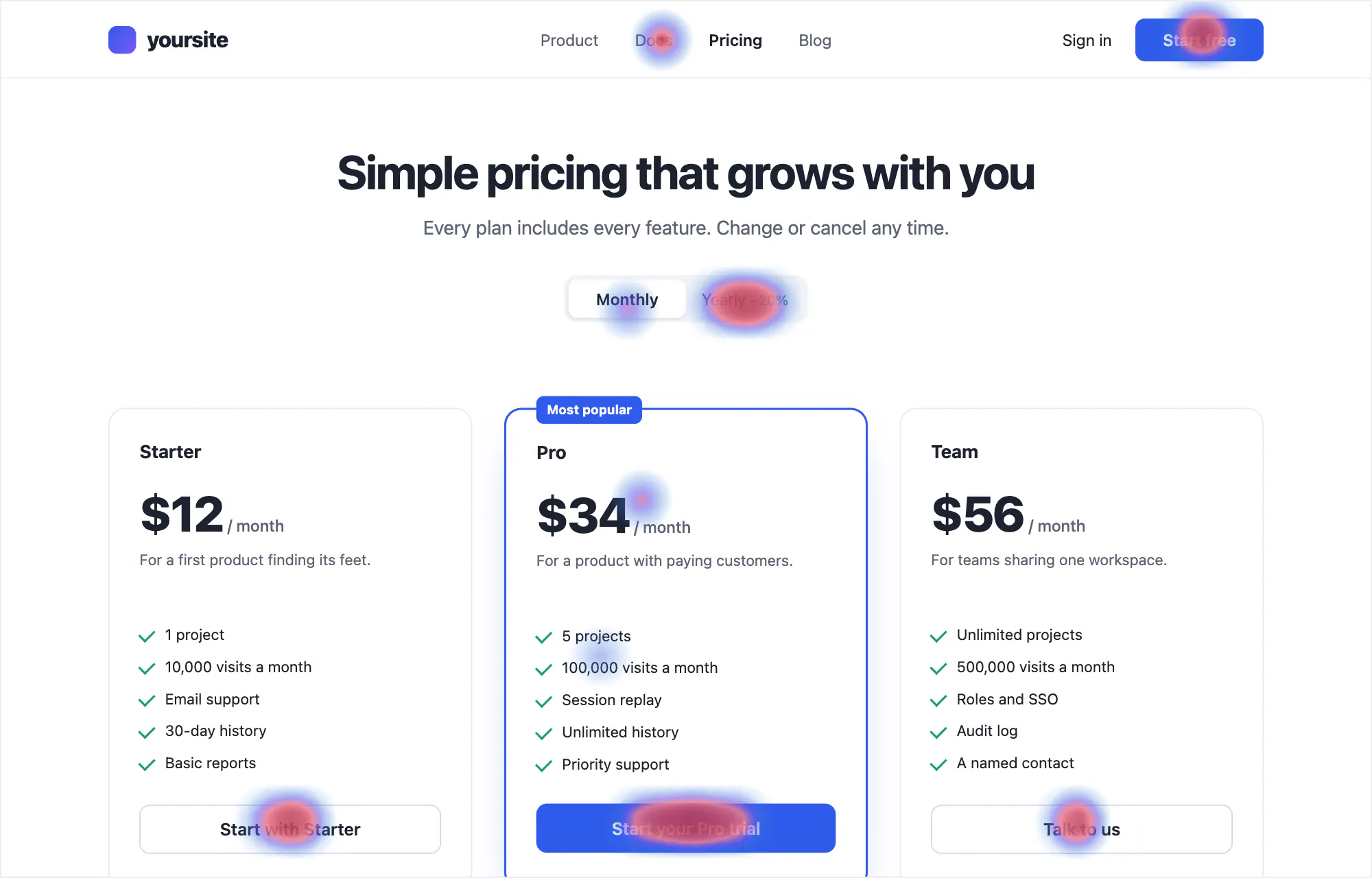
    売上のすぐ隣にリプレイとヒートマップ

    売上のレシートから、その裏にある訪問の録画を再生できます。どこがクリックされ、どこまで読まれているかもわかります。

    リプレイを見る
  4. 例
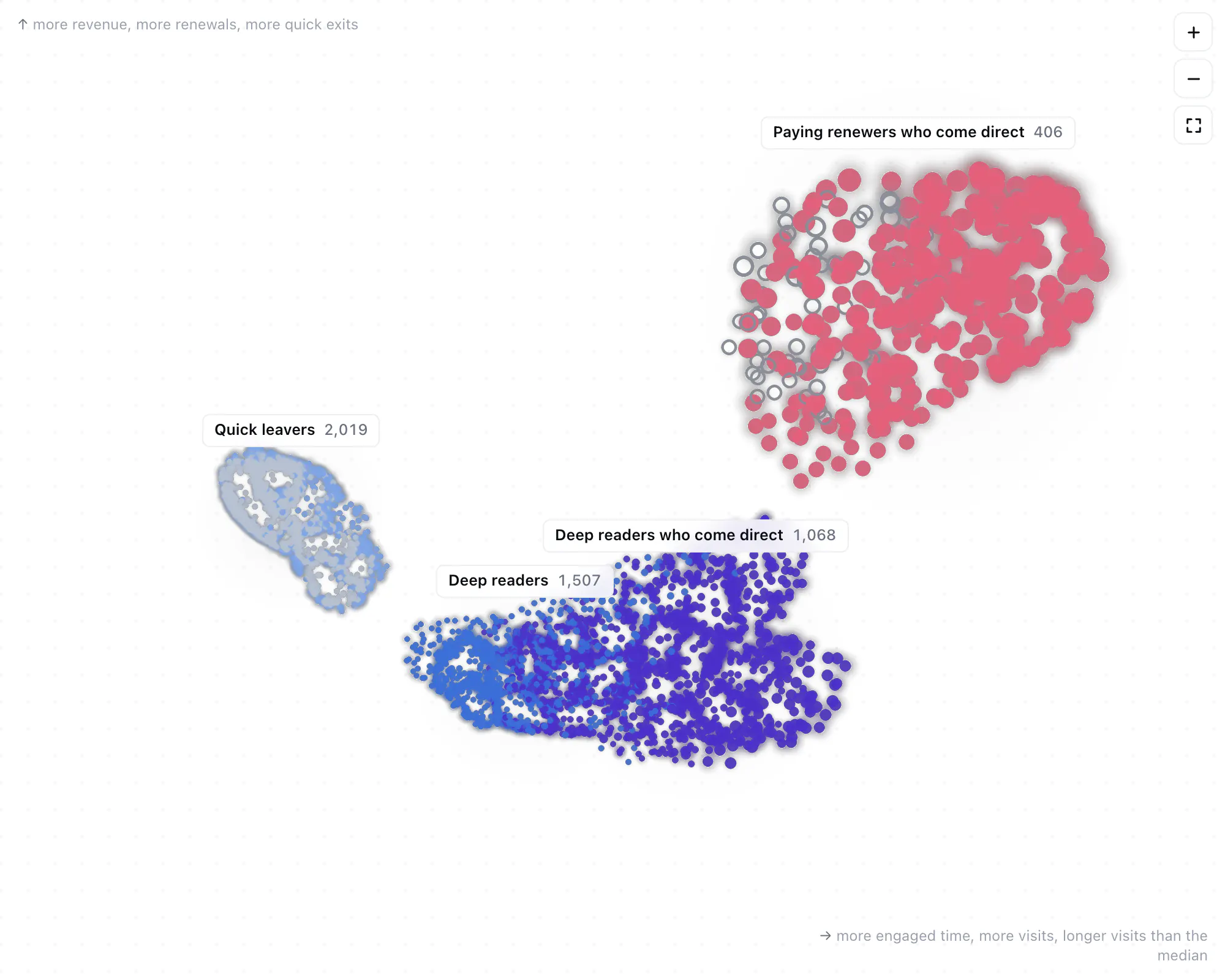
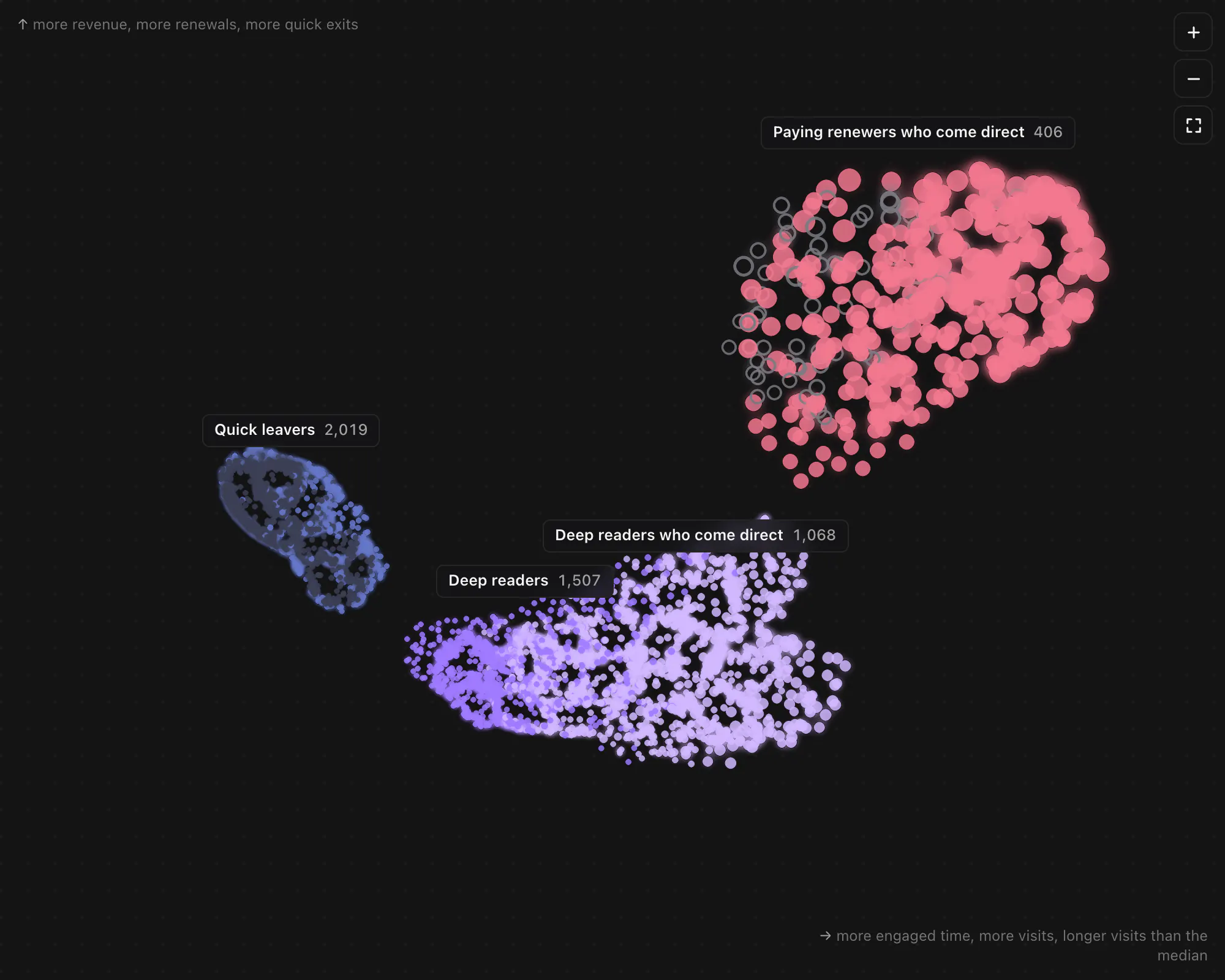
    サンプルサイトの顧客エコシステム。数千人の訪問者が光る粒子として、名前付きのクラスターにまとまり、健全度で色分けされています。サンプルサイトの顧客エコシステム。数千人の訪問者が光る粒子として、名前付きのクラスターにまとまり、健全度で色分けされています。

    Labs:生きている顧客たち

    訪問者を週ごとに動く生きたエコシステムとして、また最初の流入元から購入までのパステルカラーの川として描きます。描くのは、訪問者が実際にとった行動だけです。

    Labs を見る

01トラフィック

訪問者の流入元を、あなたが使う名前で。

リファラーは、見ればわかる流入元名になります。t.co は x.com、chatgpt.com は ChatGPT、news.ycombinator.com は Hacker News です。流入元はそれぞれチャネルに属し、AI アシスタントから来た人には専用のチャネルがあります。内訳のどの行にも、その訪問者数と裏にある収益が表示されます。

AI クローラーは訪問者とは別に数え、訪問者としては扱いません。ほとんどのクローラーはページのスクリプトを実行しないため、サーバー側の数行のコードで記録します。そのほかのボットや自動化されたブラウザは一切数えません。そして、リファラーのない訪問である Direct は、最も可能性の高い経路として読み解きます。直接入力やブックマーク、共有されたリンク、チェックアウトからの戻り、アプリ内ブラウザのいずれかです。上のダッシュボードで確認できます。

  • t.co/3xYq…x.comOrganic Social
  • www.google.deGoogleOrganic Search
  • chatgpt.comChatGPTAI Assistants
  • news.ycombinator.comHacker NewsOrganic Social
  • ?utm_source=newsletterNewsletterEmail
  • Instagram のアプリ内ブラウザInstagramOrganic Social

訪問者とは別に集計

  • GPTBot
  • ClaudeBot
  • PerplexityBot
  • Bytespider
図 2生のリファラーが流入元とチャネルになるまで。AI クローラーは別に一覧表示します。

ピーク時間帯は、期間を曜日と時間帯ごとに並べ、訪問・売上件数・収益で表示します。最も多い 3 つの時間帯は、データが裏づける場合にだけ示します。

例

Peak hours

Last 30 days · UTC

Busiest on Tuesdays, 14:00–17:00

1.9× the visits of an average three hours. Post around Tue 13:00 to be there as they arrive.

000102030405060708091011121314151617181920212223Total
Mon2,11723$954
Tue3,08636$1,417
Wed2,18123$997
Thu2,05722$942
Fri1,84421$874
Sat2,21324$1,007
Sun1,78620$827
All15,284169$7,019
Busiest three hours

Shades are each hour's average over the times this period holds it, so a weekday that comes round five times doesn't outshine one that comes round four. The totals beside and below are the period's actual sums, not averages.

図 3サンプルサイトの過去 30 日間のピーク時間帯。訪問・売上件数・収益を切り替えたり、時間帯にカーソルを合わせたりできます。

02訪問者

すべての訪問者と、その流入元、支払った金額。

訪問者ごとに 1 行。ID から生成した親しみやすい名前とアバター、所在地と使っている環境、直近の訪問の流入元と閲覧ページ、訪問ごとのエンゲージメント時間、支払った金額を表示します。行を開くとすべての訪問が並び、行動の流れのページでは各ページ・ゴール・支払いが見られます。

「Likely to buy」で並べ替えると、スコアの要因が表示されます。再訪問と、料金ページやチェックアウトでの滞在時間です。Cookie なしモードでは 1 行が 1 回の訪問になり、ページにもそう表示されます。

例

訪問者 11,293 人 · 支払い 133 人 · 過去 30 日間

  1. Glad HamsterCustomerBerlin, Germany · Desktop · FirefoxRedditOrganic Sociallatest visit: 4 pages/blog/stripe-fees+2/thanks3 visits3m 08s median6m 42s longest$49

    Visits, last 30 days

    Whole journey
    1. RedditOrganic Social
      /blog/stripe-fees/pricing/signup/thanks

      4 pages · 6m 42s engaged · 1 goal$49 credited to this visit

    2. Directtyped or bookmark
      /pricing/docs

      2 pages · 1m 36s engaged

    3. GoogleOrganic Search
      /blog/stripe-fees/

      2 pages · 3m 08s engaged

  2. Cosy CapybaraAustin, United States · Mobile · SafariGoogleOrganic Searchlatest visit: 2 pages//pricing1 visit1m 11s engaged–

    Visits, last 30 days

    Whole journey
    1. GoogleOrganic Search
      //pricing

      2 pages · 1m 11s engaged

  3. Spry BisonToronto, Canada · Desktop · ChromeChatGPTAI Assistantslatest visit: 4 pages/compare+2/docs/api2 visits3m 57s median5m 44s longest–

    Visits, last 30 days

    Whole journey
    1. ChatGPTAI Assistants
      /compare/pricing/docs/docs/api

      4 pages · 5m 44s engaged · 1 outbound click

    2. PerplexityAI Assistants
      /compare

      1 page · 2m 09s engaged

  4. Snug CapybaraCustomerLeeds, United Kingdom · Desktop · EdgeNewsletterEmaillatest visit: 2 pages/changelog/2 visits1m 41s median2m 34s longest$120

    Visits, last 30 days

    Whole journey
    1. NewsletterEmail
      /changelog/

      2 pages · 2m 34s engaged

    2. Directtyped or bookmark
      /

      1 page · 48s engaged

  5. Bubbly LlamaUtrecht, Netherlands · Mobile · Chromex.comOrganic Sociallatest visit: 1 page/blog/launch-week1 visit1m 04s engaged–

    Visits, last 30 days

    Whole journey
    1. x.comOrganic Social
      /blog/launch-week

      1 page · 1m 04s engaged

  6. Velvet PenguinBengaluru, India · Desktop · ChromeHacker NewsOrganic Sociallatest visit: 3 pages/blog/stripe-fees/docs/pricing1 visit4m 56s engaged–

    Visits, last 30 days

    Whole journey
    1. Hacker NewsOrganic Social
      /blog/stripe-fees/docs/pricing

      3 pages · 4m 56s engaged

  7. Keen KoalaCustomerSão Paulo, Brazil · Tablet · SafariDirecttyped or bookmarklatest visit: 3 pages//pricing/signup2 visits1m 49s median3m 03s longest$29

    Visits, last 30 days

    Whole journey
    1. Directtyped or bookmark
      //pricing/signup

      3 pages · 3m 03s engaged · 1 goal$29 credited to this visit

    2. Directtyped or bookmark
      /

      1 page · 35s engaged

図 4サンプルサイトの訪問者リスト(新しい順)。ある顧客の訪問を展開しています。

03収益

どの決済サービスの支払いも、ドル建て・税抜きで。

Stripe、Paddle、Lemon Squeezy、Polar は、あなたが作成するキーで接続します。キーの権限は、Tally が読み取る範囲と、専用の Webhook を追加する権限だけです。まず過去 365 日分を取り込み、その後は支払いが発生するたびに取り込みます。

WooCommerce と Squarespace のストアはワンクリックで接続できます。 WooCommerce の承認画面で Tally を承認するか(Integrations ページまたは Tally の WordPress プラグインから)、Squarespace の確認ページで承認すると、返金も含めて 1 年分の注文が取り込まれます。WooCommerce の注文は、注文受付ページか、チェックアウト時にプラグインが注文に保存する訪問者 ID で訪問に紐づきます。Squarespace の注文は、Code Injection に入れた Tally のコードを通じて、注文状況ページで紐づきます。WooCommerce の手順・Squarespace の手順。

最も深く連携するのは Stripe です。Checkout、Payment Links、サブスクリプション、請求書に対応し、Payment Links にはスニペットが自動でタグを付けます。Paddle、Lemon Squeezy、Polar では、チェックアウトに渡した訪問者 ID か、購入者のメールアドレスで売上を紐づけます。

Gumroad や FastSpring から自社の課金システムまで、そのほかの決済サービスは、あなたのサーバーが各支払いを Payments API に送信します。ボディは DataFast と同じ形式で、ほかと同じように紐づけます。届くのは送信したものだけで、インポートはしません。

新規の売上、更新、アップグレード、返金、チャージバックを区別します。金額は税抜きで、その日の欧州中央銀行のレートで米ドルに換算します。決済サービスがどう報告しても、1 つの支払いは 1 回だけ数えます。

  • Stripe

    読み取る内容
    Checkout、Payment Links、サブスクリプション、請求書。返金とチャージバックも含みます。
    紐づけ方法
    Checkout のメタデータに入れた訪問者 ID、スニペットが Payment Links に自動で付けるタグ、完了ページの Stripe のセッション ID、または購入者のメールアドレス。
    接続方法
    制限付きキー
  • Paddle

    読み取る内容
    取引とサブスクリプション。返金とチャージバックも含みます。
    紐づけ方法
    Paddle.js の customData、または取引の custom_data に入れた訪問者 ID(更新時も引き継がれます)、あるいは顧客のメールアドレス。
    接続方法
    必要な権限だけを持つ API キー
  • Lemon Squeezy

    読み取る内容
    注文とサブスクリプションの請求書。返金も含みます。Lemon Squeezy はチャージバックを報告しません。異議のある注文は返金され、その返金が届きます。
    紐づけ方法
    チェックアウトリンクのカスタムデータ、または API の checkout_data に入れた訪問者 ID。あるいは顧客のメールアドレスで、接続前の注文はこれでしか紐づけられません。
    接続方法
    専用に作成した API キー(スコープはありません)
  • Polar

    読み取る内容
    注文とサブスクリプション。返金に加え、負けた異議申し立てをチャージバックとして扱います。
    紐づけ方法
    チェックアウトのメタデータ、チェックアウトリンクの reference_id、または顧客のメールアドレス。
    接続方法
    必要なスコープだけを持つ組織トークン
  • WooCommerce

    読み取る内容
    支払い済みの注文とその返金。返金ごとに戻された税額も記録します。30 分ごとに変更のあった注文を読み直すので、Webhook を取りこぼしても失われるものはありません。
    紐づけ方法
    ストアにスニペットを入れたうえでの注文受付ページ、チェックアウト時に Tally の WordPress プラグインが注文に保存する訪問者 ID、または購入者のメールアドレス。
    接続方法
    Tally または Tally の WordPress プラグインから、WooCommerce の承認画面でワンクリック。あるいは REST API キー
  • Squarespace

    読み取る内容
    支払い済みの注文とその返金。ワンクリックで接続すれば新しい注文は数秒で、API キーなら 10 分ごとに届きます。
    紐づけ方法
    Code Injection にスニペットと注文用のコードを入れたうえでの注文状況ページ、または購入者のメールアドレス。
    接続方法
    Squarespace の確認ページでワンクリック、またはサイトで作成した API キー
  • Payments API

    読み取る内容
    そのほかの決済サービスの支払いを、あなたのサーバーから送信します。Gumroad、FastSpring、PayPal、自社の課金システムなど。更新と返金も含みます。届くのは送信したものだけです。
    紐づけ方法
    サーバーが支払いと一緒に送る訪問者 ID、または購入者のメールアドレス。
    送信方法
    支払いを記録できる API キー。ボディは DataFast の API と同じ形式です
図 5決済サービスごとに取得できる内容と、売上を訪問に紐づける方法。メールでの照合には、ログイン中のユーザーをアプリからスニペットに伝える必要があります。保存するのはアドレスのハッシュだけです。

支払い(11月2日〜7日)

例
日付種類支払元税抜
11月2日(月)新規Stripeチェックアウト$49.00
11月2日(月)新規Lemon Squeezyチェックアウトリンク$120.00
11月3日(火)アップグレードStripeプラン変更(日割り)$30.00
11月4日(水)更新Paddle月額サブスクリプション$49.00
11月5日(木)新規Polarチェックアウト、€45.00 を当日のレートで換算$48.65
11月5日(木)新規WooCommerceストアの注文$39.00
11月6日(金)新規Squarespaceストアの注文$59.00
11月6日(金)返金Stripe10月30日の売上分−$49.00
11月7日(土)更新Payments APIサーバーから送信$15.00
11月7日(土)チャージバックPaddleカード発行会社が異議を申し立て−$19.00
今週の収益$341.65
図 6サンプルサイトの 1 週間分の支払い。各決済サービスと Payments API から届いたものです。返金とチャージバックは、発生した日の分から差し引きます。

04レシート

すべての売上に、レシートが付きます。

確かめられない収益の数字は、ただの推測です。どの売上を開いても、Tally はその裏にある流れを示します。購入者の初回訪問、その後の訪問、売上が帰属する訪問、支払いをそのブラウザに紐づけた根拠、そして支払いです。それぞれに、決済サービス側で照会できる ID が付いています。

さらに、紐づけた方法とその確度も示します。何も紐づかない売上は、レシートにそう書かれます。推測で埋めることはありません。

レシート例

$49.00

Pro プラン、新規サブスクリプション、10月14日 16:42 に支払い

  1. 初回訪問10月2日 09:14

    Google から /blog/stripe-fees に着地

    訪問者7Hq2mK…xR

  2. さらに 2 回の訪問10月6日、10月14日

    Direct、続いて Reddit

  3. 帰属先の訪問10月14日 16:31

    reddit.com/r/SaaS から /pricing に着地。Direct 以外で来た最後の訪問です。

    セッション0192f3a1-7c…

  4. 紐づけ10月14日 16:40

    Checkout Session のメタデータに訪問者 ID が入っています。

    チェックアウトcs_test_b1Fz…

  5. 支払い10月14日 16:42

    $49.00(税抜)

    支払いpi_3QJx8L…

紐づけ方法
チェックアウトのメタデータ
確度
高
帰属先
Reddit, Organic Social

レシート例

$120.00

Team プラン、請求書払い、10月2日 11:20 に支払い

  1. 初回訪問(帰属先)9月28日 20:05

    ChatGPT から /compare に着地。Direct 以外で来た最後の訪問です。

    訪問者Qm81Zt…c4

  2. さらに 1 回の訪問10月1日

    Direct、アプリにログイン

  3. 識別10月1日 09:12

    アプリがログイン中のユーザーをタグに伝えました。保存するのはアドレスのハッシュだけです。

  4. 紐づけ10月2日 11:20

    請求書の顧客のメールハッシュが一致しました。ID を持つチェックアウトはありませんでした。

    メールハッシュ5d41402a…2a

  5. 支払い10月2日 11:20

    $120.00(税抜)

    請求書in_1QH7tA…

紐づけ方法
メールの照合
確度
中
帰属先
ChatGPT, AI Assistants

レシート例

$29.00

Starter プラン、新規サブスクリプション、11月6日 08:12 に支払い

  1. 初回訪問不明

    購入者を訪問に結びつけるものはありません。

  2. 帰属先の訪問なし

    帰属する訪問はなく、推測もしません。

  3. 紐づけ見つかりません

    チェックアウトに訪問者 ID がなく、タグ付きの Payment Link も、完了ページへの訪問も、一致するメールアドレスもありません。

  4. チェックアウト11月6日 08:11

    訪問者 ID なしでサーバーが作成しました。

    チェックアウトcs_test_c9Ld…

  5. 支払い11月6日 08:12

    $29.00(税抜)

    支払いpi_3QK2rB…

紐づけ方法
なし
確度
なし
帰属先
なし。カバー率を下げます。

理由と変更点はカバー率のリストにあります:05 カバー率を見る

図 73 件の売上の例とそのレシート。チェックアウトのメタデータで紐づいたもの、メールの照合で紐づいたもの、まったく紐づかなかったもの。

05カバー率

見えないものは、見えないと伝えます。

カバー率とは、収益のうち訪問者に紐づいている割合です。その下にあるのが修正リストで、支払いを紐づけられなかった理由ごとに、該当する支払いの件数と金額、そしてそれを直すコードを示します。

何も紐づかない支払いは未紐づけのままで、カバー率を下げます。購入者の完了ページへの訪問など、根拠があとから届けば、その時点で紐づけます。

カバー率(過去 30 日間)

例

86%

過去 30 日間の $3,830 のうち、$3,294 が訪問者に紐づいています。14 件、$536 は紐づいていません。

修正する

  1. 訪問者 ID のない Checkout Session9 件、$343

    セッションの作成時に訪問者 ID を渡します。更新にも引き継がれるよう、サブスクリプションにも渡してください。Node、Next.js、Python、Ruby、PHP 用のスニペットがあります。

    const id = req.cookies._tally_vid;
    
    await stripe.checkout.sessions.create({
      // …your line items and URLs
      metadata: { tally_visitor_id: id },
      subscription_data: {
        metadata: { tally_visitor_id: id },
      },
    });
  2. どのチェックアウトかわからない完了ページ3 件、$95

    購入者が戻ってくるページに Stripe のセッション ID を付ければ、そのページへの訪問で売上が紐づきます。

    success_url:
      "https://yoursite.com/thanks?session_id={CHECKOUT_SESSION_ID}"
  3. 請求書など、チェックアウトを通らない支払い2 件、$98

    ログイン中のユーザーをタグに伝えます。アドレスは届いた時点でハッシュ化され、購入者のものと照合されます。アドレスそのものは保存しません。

    tally('identify', { email: user.email });
図 8サンプルサイトのカバー率と修正リスト。修正ごとのコードつきです。

06購入までの経路

購入者はどうやってあなたを見つけ、何が購入の決め手になるのか。

購入までの経路は、期間中の新規売上の裏にある道のりです。初回訪問から購入までの時間、必要な訪問回数とページ数、初回訪問で購入する人数がわかります。フローチャートは、各購入者を最初に連れてきた流入元から、売上の帰属先となった流入元までをつなぎます。

顧客生涯価値は、各顧客を初回訪問の流入元に計上し、それ以降に支払った金額をすべて合算します。更新、アップグレード、返金も含みます。

例

Path to purchase

Last 30 days · 112 of 133 new sales, the ones linked to a visitor

Median time to buy

3days

from their first visit

Median visits

3visits

the one they paid in included

Bought on the first visit

14%

16 of 112

Pages before buying

10.5

median pages viewed

Where buyers came from, and who closed the sale

112 new sales: where each buyer first came from, and the source credited with the sale.

51% of new sales were credited to the source that first brought the buyer in. Hover or focus a flow for its numbers.

  1. Googlecredited toGoogle27
  2. x.comcredited tox.com11
  3. Other (3 sources)credited toOther (3 sources)11
  4. Directcredited toOther (3 sources)10
  5. ChatGPTcredited toChatGPT10
  6. Redditcredited toReddit9
  7. Other (3 sources)credited toNewsletter9
  8. Googlecredited toNewsletter6

6 smaller flows in the table below.

Show the flows as a table
112 new sales: where each buyer first came from, and the source credited with the sale.
Brought them inCredited with the saleNew salesShare
GoogleGoogle2724%
x.comx.com1110%
Other (3 sources)Other (3 sources)1110%
DirectOther (3 sources)109%
ChatGPTChatGPT109%
RedditReddit98%
Other (3 sources)Newsletter98%
GoogleNewsletter65%
DirectGoogle54%
x.comGoogle54%
RedditGoogle44%
DirectReddit22%
ChatGPTGoogle22%
Other (3 sources)ChatGPT1<1%

Time from first visit to purchase

  1. 16Same visit: 16 sales (14%), bought in their first visit
  2. 13Same day: 13 sales (12%), a later visit, under 24 hours after the first
  3. 311–3 days: 31 sales (28%), 1 to 3 days after the first visit
  4. 204–7 days: 20 sales (18%), 4 to 7 days after the first visit
  5. 161–2 weeks: 16 sales (14%), 8 to 14 days after the first visit
  6. 112–4 weeks: 11 sales (10%), 15 to 28 days after the first visit
  7. 51–3 months: 5 sales (4%), 29 to 90 days after the first visit
  8. 03+ months: 0 sales (0%), 91 days or more after the first visit

Pages buyers saw before paying

Share of the 112 buyers who viewed each page before paying

  1. /pricing96%, 108 of 112 buyers
  2. /71%, 80 of 112 buyers
  3. /signup64%, 72 of 112 buyers
  4. /docs38%, 43 of 112 buyers
  5. /blog/stripe-fees26%, 30 of 112 buyers
  6. /compare22%, 25 of 112 buyers
  7. /changelog8%, 10 of 112 buyers
  8. /blog/launch-week6%, 7 of 112 buyers

Only new sales count here. Renewals and upgrades belong to the visit that won the subscription, so counting them would count that journey again.

図 9サンプルサイトの購入までの経路。中央値、最初の流入元から帰属先の流入元への流れ、かかる時間、購入者が見たページ。流れにカーソルを合わせてみてください。
例

Lifetime value by first source

All time: every payment since 1 Nov 2025. The period above doesn't apply.

First sourceCustomersLifetime revenueAverage valueRenewalsRepeat rate
GoogleOrganic Search285$35,568$12574152%
ChatGPTAI Assistants110$18,396$16734161%
Direct156$15,964$10232844%
NewsletterEmail83$15,330$18531569%
Hacker NewsOrganic Social74$10,343$14020055%
x.comOrganic Social101$8,949$8914133%
RedditOrganic Social74$7,942$10714141%
PerplexityAI Assistants37$5,587$1518957%
Every source920$118,081$1282,29651%

A customer is a visitor linked to a sale, counted under the source of their first visit. Lifetime revenue is net of refunds and chargebacks; repeat rate is the share who paid more than once (a renewal, an upgrade or another purchase). $11,540 from 374 payments not linked to a visitor is in no row.

図 10サンプルサイトの初回流入元別の顧客生涯価値。

07読まれているページ

ページの滞在時間は、読んでいる間だけ数えます。

計測が進むのは、タブが表示されていて、訪問者が直近 30 秒以内にスクロール、入力、タップ、ポインター操作のいずれかをしたときだけです。ほかのタブの裏で 8 時間開いたままのタブは、何も加算しません。 ダッシュボードは訪問あたりの中央値を表示するので、閉じ忘れたタブ 1 つで数値が跳ね上がることはありません。

1 回のページビュー

例

表示時間8分35秒

エンゲージメント2分05秒

  1. 1分10秒読んでスクロール中計測
  2. 30秒まだ操作なし:30 秒間は計測を続けます計測
  3. 2分30秒操作がないまま:計測を止めます計測しない
  4. 4分00秒別のタブを表示中計測しない
  5. 25秒戻ってきて再びスクロール計測
図 11ページビューの例:表示時間 8 分 35 秒、うちエンゲージメント時間 2 分 5 秒。

Pages では、どこまでスクロールされたかもわかります。ページごとの読了時間と深度、最後まで到達した人数、そして購入者が支払い前にページをどう読んだかを、購入しなかった人と比べて示します。

例

Reading time

38s

median per pageview

Scroll depth

59%

average depth, of 25,694 views measured

Read to the end

27%

of measured views reached 90% or more

What they read

27,628 pageviews · last 30 days

Open a page to see how far down people read it, and how buyers read it before paying.

  1. /pricing5,217 views78% scrolled on average58s reading time, median

    58s

    reading time, median per view

    78%

    scrolled, on average

    5,217 views · 4,904 with a measured depth

    How far down they read

    Share of measured views that scrolled at least this far

    1. 25% — reached a quarter of the page:95%
    2. 50% — reached half of the page:84%
    3. 75% — reached three quarters of the page:69%
    4. 90%+ — reached the end of the page:48%

    Buyers before paying vs didn't buy

    • Buyers, before paying159 views · 114 buyers96% scrolled on average,1m 41s reading time, median
    • Didn't buy5,020 views · 3,585 visitors61% scrolled on average,44s reading time, median

    38 views by buyers after paying are left out of both.

    Buyers are visitors whose first sale came after viewing this page; only their views before that payment count.

Reading time runs only while the tab is visible and the visitor is active; it's the median per view. A view with no engagement report counts as 0s of reading. Its scroll depth is unknown, so it's left out of every scroll figure rather than counted as 0%. 25,694 of 27,628 pageviews have a measured depth.

図 12サンプルサイトで読まれているページ(料金ページを展開)。どこまで読まれているか、購入者とそれ以外の比較。

08リプレイとヒートマップ

購入した訪問を再生し、みんながどこをクリックしているかを見る。

サイトでリプレイをオンにすると、録画された訪問を再生でき、タイムラインにはページ、ゴール、レイジクリック、支払いがすべて並びます。購入者の行動の流れとレシートから、録画へ直接移動できます。入力はすべてマスクされ、パスワードは一切記録しません。

ヒートマップは、クリック、レイジクリック、デッドクリック、スクロール深度をページの上に直接描きます。デスクトップ、タブレット、スマートフォンに対応しています。

図 13サンプルサイトで録画された訪問。どれもプレーヤーで開けます。
例
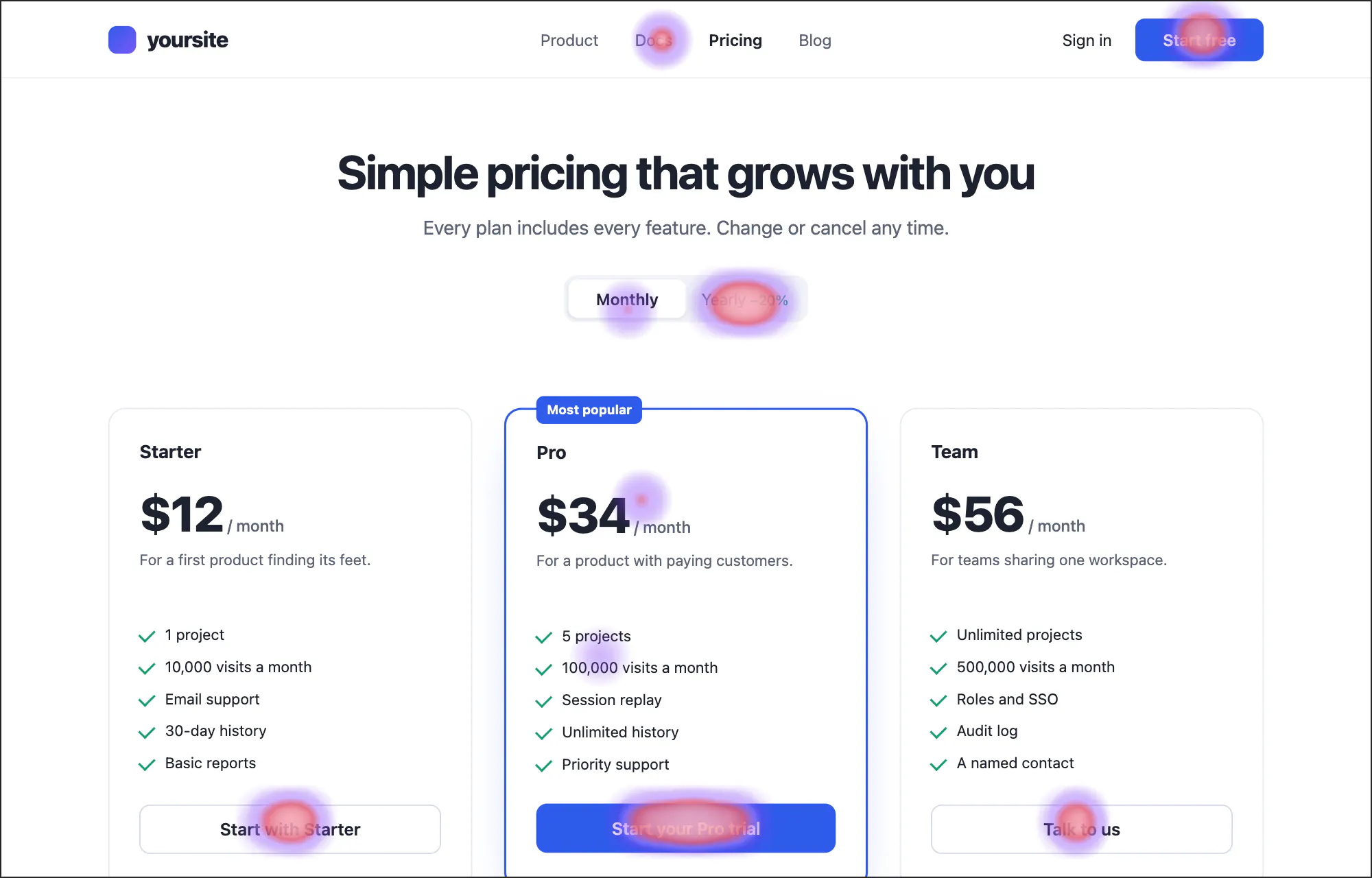
サンプルサイトの料金ページのクリックヒートマップ。プランのボタンにクリックが集まり、請求期間の切り替えにレイジクリックが見られます。サンプルサイトの料金ページのクリックヒートマップ。プランのボタンにクリックが集まり、請求期間の切り替えにレイジクリックが見られます。
図 14サンプルサイトの料金ページのクリックヒートマップを、録画された訪問のページに重ねて描いたもの。どこがクリックされ、どこで苛立ちのクリックが起きているか。

/pricing のヒートマップ(過去 30 日間)

例

09ライブ

いま、サイトに誰がいるか。

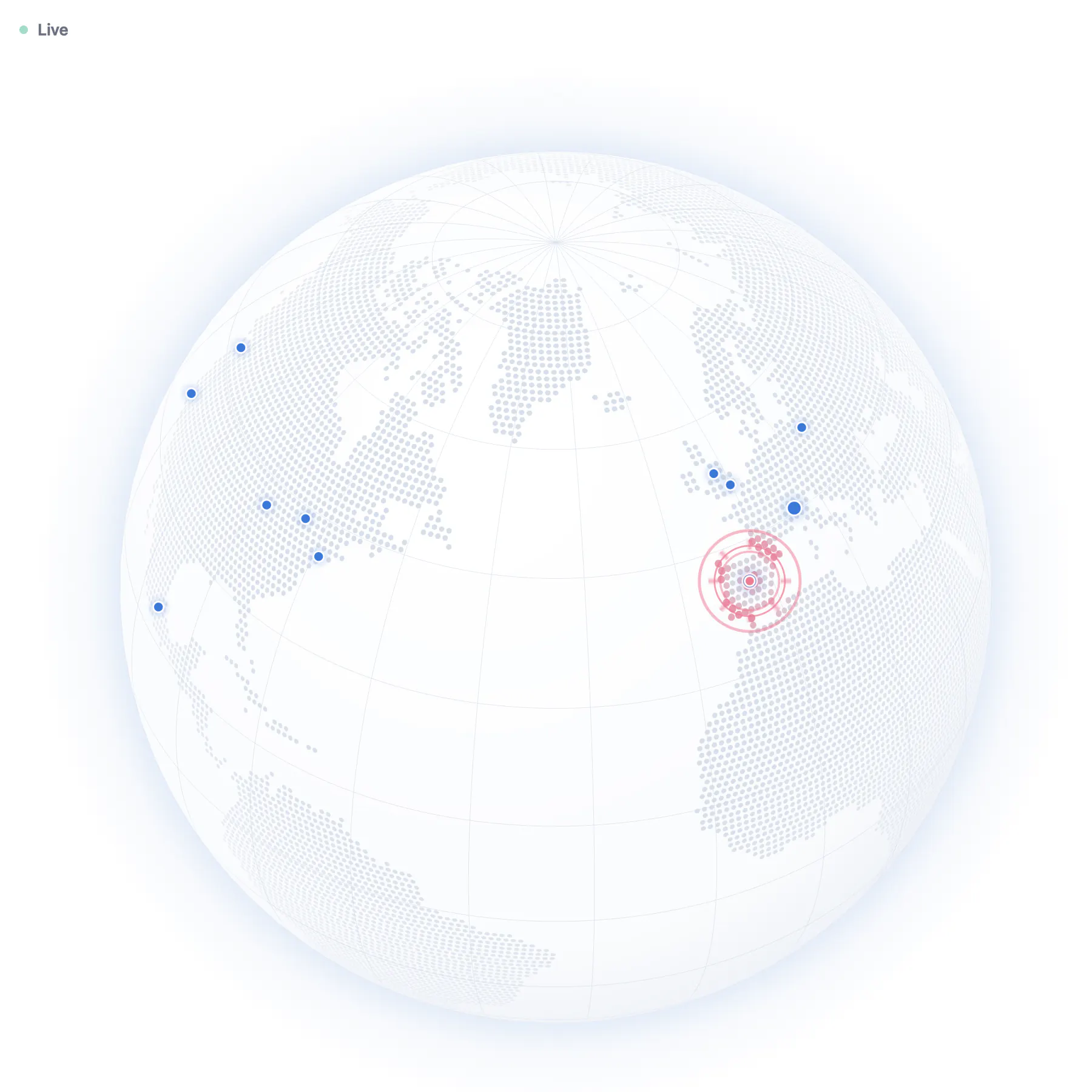
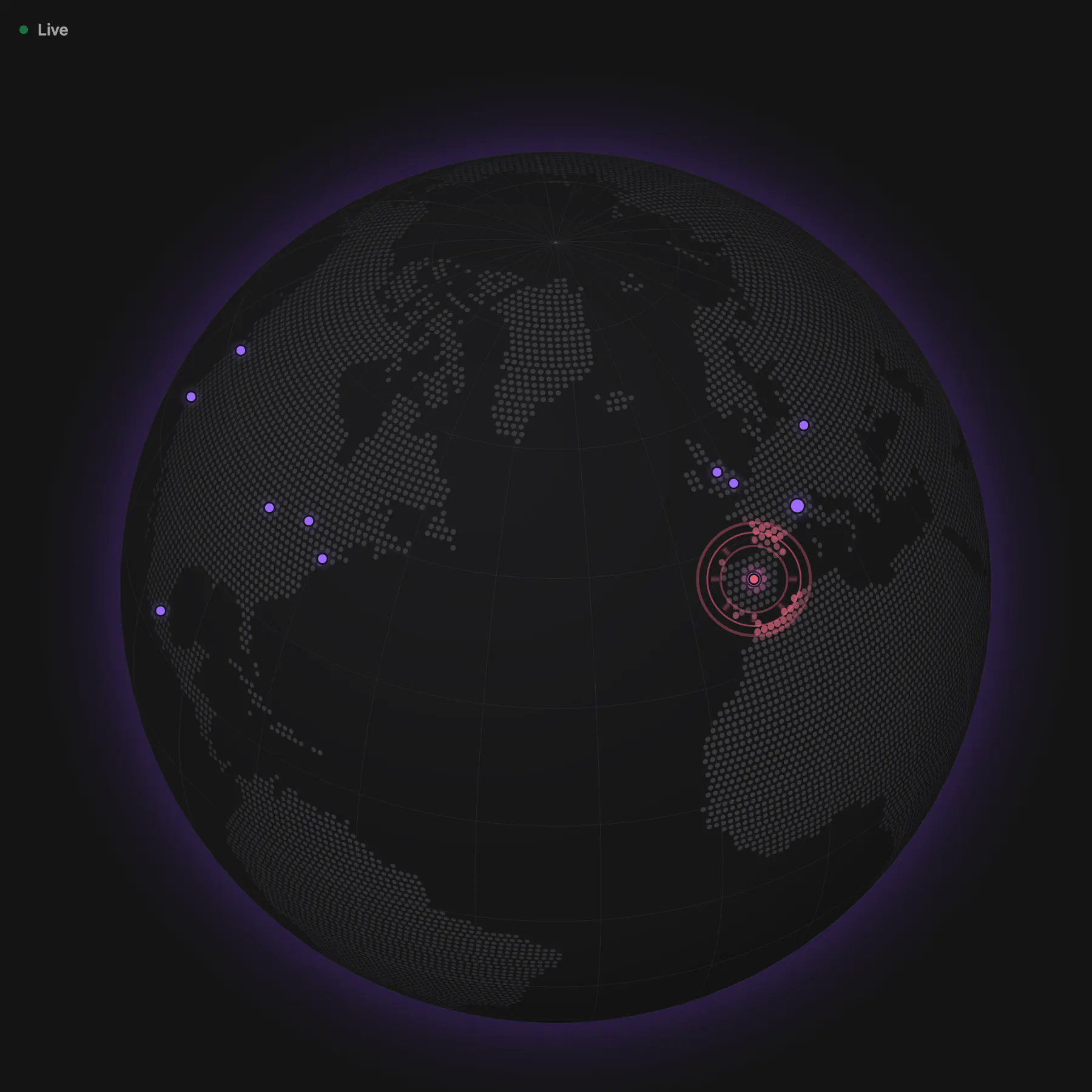
直近 5 分間を地球儀または平面の地図に表示し、隣のリストに各訪問者の国旗、ページ、都市、流入元を並べます。新しい訪問者はリングで現れ、売上は購入者の都市でコーラル色に弾けます。訪問者をクリックすると場所がわかり、直近 8 時間を 15 分刻みで再生できます。

例
サンプルサイトのライブ地球儀。直近 5 分間の訪問者がヨーロッパと南北アメリカの各都市にピン留めされ、売上がコーラル色に弾けています。サンプルサイトのライブ地球儀。直近 5 分間の訪問者がヨーロッパと南北アメリカの各都市にピン留めされ、売上がコーラル色に弾けています。

Live

The globe and the map need JavaScript. The list beside them is as of loading this page.

5 visitors

in the last 5 minutes, from 4 countries

図 15サンプルサイトのライブビュー。直近 5 分間の訪問者がいる場所にピン留めされ、隣にリストがあります。再生すると本物の地球儀が動きます。

10Labs

顧客を、生きたエコシステムと川として。

Tally が持つシグナルだけから描く、2 つの実験的なビューです。エコシステムは、過去 90 日間のすべての訪問者を行動に応じて配置し、際立つ特徴で名付けたクラスターにまとめ、健全度で色分けします。再生すると週ごとに動きます。

川は、訪問者を連れてきた流入元から、到達したページを経て、購入したかどうかまでを週ごとに追い、流入元、体験、結果のいずれかで色分けします。健全度は、更新、返金、チャージバック、最近の利用状況から私たちが読み取ったもので、予測ではありません。

例

Labs

Customer ecosystem

Experimental

5,000 most recent of 32,059 visitors from the last 90 days. Each is placed by what they did, gathered with the ones most like them, and coloured by health.

サンプルサイトの顧客エコシステム。数千人の訪問者が光る粒子として、名前付きのクラスターにまとまり、健全度で色分けされています。サンプルサイトの顧客エコシステム。数千人の訪問者が光る粒子として、名前付きのクラスターにまとまり、健全度で色分けされています。

more engaged time, more visits, longer visits than the median

more revenue, more renewals, more quick exits

The picture needs JavaScript and WebGL 2. Everything it shows is in the table below.

What the picture shows, and what feeds it

Reading it

  • Position: Each particle is a visitor of the last 90 days, placed by its signals (below), standardised and projected to two directions with PCA, computed on our server the same way every time. Particles near each other did similar things.
  • Left to right: more engaged time, more visits, longer visits than the median (48% of the variation). The other way: less engaged time, fewer visits, shorter visits than the median.
  • Bottom to top: more revenue, more renewals, more quick exits (15% of the variation). The other way: less revenue, fewer renewals, fewer quick exits.
  • Clusters: k-means on the picture's three main directions, with the number of clusters chosen by how cleanly they separate (silhouette). Names come from each cluster's standout traits by fixed rules.
  • Size: for customers, lifetime net revenue; for everyone else, the visitor list's likely-to-buy score (a point a visit up to 10, two a minute on pricing and checkout pages up to 20).
  • Glow: how recently they were seen, brightest today and gone after two weeks.
  • Weeks: the slider replays the particles shown as they were at the end of each week. Each appears from its first visit in the 90 days, so the early weeks hold only those already around then.
  • Trails: where a particle was in the three weeks before the one shown, for the cluster you pick, and faintly for everyone while the weeks play.

Colour: customers' health

  • RenewingA customer whose last purchase or renewal is within their renewal cycle (30 days until they have one), or who has visited within it.
  • QuietA customer with no renewal and no visit for longer than their renewal cycle (30 days until they have one) and a few days' grace.
  • LostA customer whose most recent payment was refunded or charged back, with no purchase since.

Colour: everyone else's engagement

  • HotNot a customer; engagement 0.75 or more.
  • WarmNot a customer; engagement 0.5 to 0.75.
  • CoolNot a customer; engagement 0.25 to 0.5.
  • ColdNot a customer; engagement under 0.25.

Engagement is half engaged time a visit against the site's median, a quarter recency and a quarter return visits. Health and engagement are our reading of renewals, refunds, chargebacks and recency, not a prediction.

Signals

  • Visits · visits in the last 90 days
  • Engaged time · engaged time (the tracker's visible-and-active clock), outlier visits left out
  • Pages a visit · pageviews ÷ visits
  • Days since the last visit · days from the last visit to the snapshot
  • From search · share of visits from Organic and Paid Search
  • From social and video · share of visits from Organic and Paid Social and Video
  • From AI assistants · share of visits from AI assistants (ChatGPT, Claude, Perplexity …)
  • Direct · share of visits with no referrer
  • From links, email and ads · share of visits from referrals, email, affiliates and display
  • Pricing page views · views of pricing and plans pages
  • Checkout page views · views of checkout, cart, buy, upgrade, subscribe and billing pages
  • Goals completed · goals sent by the site's tag
  • Net revenue · payments linked to the visitor, refunds taken off (all time, US dollars)
  • Renewals · renewal payments
  • Refunds and chargebacks · refunds and chargebacks
  • Rage clicks · rage clicks per recorded visit (only where sessions were recorded)
  • Dead clicks · dead clicks per recorded visit (only where sessions were recorded)
  • Quick exits · share of visits with one page and under 10 s engaged
  • Engaged time against the site's median · the visitor's median engaged time a visit ÷ the site's median
  • Scroll depth · how far down pages were scrolled, on average (where the tag reports it)

Not yet: support tickets and reviews. They aren't connected, so nothing here is read from them.

The ecosystem as a table

The same clusters, with customers first by lifetime revenue and everyone else by likely to buy. Names open each journey.

Clusters, now
ClusterMembersCustomersNet revenueWhat sets it apart
Quick leavers2,0190$0Engaged time against the site's median: 0.1× on average, against 3.4× across everyone; Scroll depth: 33% on average, against 64% across everyone; Engaged time: 8s on average, against 11m 35s across everyone; Mostly from Google: 37% of them
Deep readers1,5070$0Scroll depth: 86% on average, against 64% across everyone; Quick exits: 0% of visits, against 31% across everyone; Engaged time against the site's median: 3.8× on average, against 3.4× across everyone; Mostly from Google: 42% of them
Deep readers who come direct1,0680$0Pages a visit: 5.5 on average, against 2.7 across everyone; Engaged time: 32m 05s on average, against 11m 35s across everyone; Visits: 4.3 on average, against 2.4 across everyone
Paying renewers who come direct406406$48,881Net revenue: $120 on average, against $9.78 across everyone; Goals completed: 9.2 on average, against 1.1 across everyone; Renewals: 2.1 on average, against 0.2 across everyone
Quick leavers: the first 3 of 2,019 visitors
VisitorHealthValueVisitsLast seen
Zippy Raccoon CoolLikely to buy 2 of 302
Sincere Ibex CoolLikely to buy 2 of 302
Calm Moose CoolLikely to buy 2 of 302
Deep readers: the first 3 of 1,507 visitors
VisitorHealthValueVisitsLast seen
Twinkly Fennec HotLikely to buy 14 of 304
Dandy Fennec HotLikely to buy 14 of 303
Rustic Squirrel HotLikely to buy 13 of 304
Deep readers who come direct: the first 3 of 1,068 visitors
VisitorHealthValueVisitsLast seen
Nifty Fennec HotLikely to buy 28 of 308
Glad Lynx HotLikely to buy 28 of 308
Upbeat Wombat HotLikely to buy 28 of 308
Paying renewers who come direct: the first 3 of 406 visitors
VisitorHealthValueVisitsLast seen
Merry Hare Renewing$693 lifetime11
Spry Raccoon Renewing$693 lifetime10
Curious Gecko Renewing$594 lifetime10
図 16Labs:サンプルサイトの顧客エコシステム。過去 90 日間のすべての訪問者を行動に応じて配置し、各グループを際立たせる特徴でまとめて名付け、健全度で色分けしています。
例

Labs

Flow riverExperimental

Where visitors come from, where they go, what it earns and how it went, week by week.

21,486 visitors · $8,806 net revenueLast 8 weeks

Flows · Last 8 weeks

First touchLanding pageKey page reachedOutcomeGoogle → /: 1,214 visitors (6%), $361 net revenue, Cool (−0.20)Google → /blog/*: 2,882 visitors (13%), $365 net revenue, Cool (−0.23)Google → /docs/*: 639 visitors (3%), $277 net revenue, Warm (+0.37)Google → /pricing: 622 visitors (3%), $494 net revenue, Neutral (+0.10)Google → /compare/*: 361 visitors (2%), $293 net revenue, Neutral (−0.05)Google → /changelog: 251 visitors (1%), $51 net revenue, Cool (−0.22)Google → /signup: 251 visitors (1%), $446 net revenue, Warm (+0.32)Direct → /: 2,540 visitors (12%), $914 net revenue, Cool (−0.16)Direct → /blog/*: 298 visitors (1%), $114 net revenue, Neutral (−0.09)Direct → /docs/*: 535 visitors (2%), $254 net revenue, Warm (+0.34)Direct → /pricing: 628 visitors (3%), $644 net revenue, Warm (+0.19)Direct → /compare/*: 94 visitors (<1%), $34 net revenue, Neutral (−0.03)Direct → /changelog: 136 visitors (<1%), $0 net revenue, Cool (−0.24)Direct → /signup: 319 visitors (1%), $516 net revenue, Warm (+0.27)x.com → /: 1,359 visitors (6%), $400 net revenue, Cool (−0.51)x.com → /blog/*: 754 visitors (4%), $127 net revenue, Cool (−0.40)x.com → /docs/*: 50 visitors (<1%), $79 net revenue, Warm (+0.27)x.com → /pricing: 159 visitors (<1%), $142 net revenue, Neutral (+0.01)x.com → /compare/*: 53 visitors (<1%), $0 net revenue, Cool (−0.18)x.com → /changelog: 150 visitors (<1%), $42 net revenue, Cool (−0.38)x.com → /signup: 49 visitors (<1%), $68 net revenue, Neutral (+0.10)Reddit → /: 389 visitors (2%), $196 net revenue, Cool (−0.13)Reddit → /blog/*: 844 visitors (4%), $41 net revenue, Cool (−0.16)Reddit → /docs/*: 180 visitors (<1%), $78 net revenue, Warm (+0.37)Reddit → /pricing: 89 visitors (<1%), $168 net revenue, Warm (+0.21)Reddit → /compare/*: 90 visitors (<1%), $37 net revenue, Neutral (+0.01)Reddit → /changelog: 71 visitors (<1%), $0 net revenue, Cool (−0.28)Reddit → /signup: 35 visitors (<1%), $44 net revenue, Warm (+0.22)ChatGPT → /: 417 visitors (2%), $137 net revenue, Cool (−0.13)ChatGPT → /blog/*: 154 visitors (<1%), $75 net revenue, Neutral (+0.01)ChatGPT → /docs/*: 122 visitors (<1%), $63 net revenue, Warm (+0.39)ChatGPT → /pricing: 239 visitors (1%), $162 net revenue, Warm (+0.20)ChatGPT → /compare/*: 516 visitors (2%), $252 net revenue, Neutral (+0.01)ChatGPT → /changelog: 16 visitors (<1%), $0 net revenue, Neutral (−0.04)ChatGPT → /signup: 44 visitors (<1%), $81 net revenue, Warm (+0.39)Hacker News → /: 282 visitors (1%), $88 net revenue, Neutral (−0.03)Hacker News → /blog/*: 663 visitors (3%), $93 net revenue, Neutral (−0.07)Hacker News → /docs/*: 124 visitors (<1%), $45 net revenue, Warm (+0.33)Hacker News → /pricing: 61 visitors (<1%), $14 net revenue, Warm (+0.32)Hacker News → /compare/*: 64 visitors (<1%), $0 net revenue, Neutral (+0.11)Hacker News → /changelog: 50 visitors (<1%), $0 net revenue, Cool (−0.16)Hacker News → /signup: 24 visitors (<1%), $41 net revenue, Warm (+0.32)Other sources → /: 937 visitors (4%), $387 net revenue, Cool (−0.13)Other sources → /blog/*: 1,089 visitors (5%), $193 net revenue, Neutral (−0.09)Other sources → /docs/*: 540 visitors (3%), $162 net revenue, Warm (+0.37)Other sources → /pricing: 337 visitors (2%), $375 net revenue, Warm (+0.35)Other sources → /compare/*: 312 visitors (1%), $161 net revenue, Neutral (+0.04)Other sources → /changelog: 351 visitors (2%), $177 net revenue, Cool (−0.13)Other sources → /signup: 102 visitors (<1%), $115 net revenue, Warm (+0.35)/ → Signup: 664 visitors (3%), $929 net revenue, Warm (+0.30)/ → Pricing: 1,740 visitors (8%), $1,320 net revenue, Neutral (+0.07)/ → Docs: 507 visitors (2%), $161 net revenue, Warm (+0.25)/ → No key page: 4,227 visitors (20%), $75 net revenue, Cool (−0.44)/blog/* → Signup: 268 visitors (1%), $412 net revenue, Warm (+0.40)/blog/* → Pricing: 677 visitors (3%), $530 net revenue, Warm (+0.21)/blog/* → Docs: 348 visitors (2%), $14 net revenue, Warm (+0.19)/blog/* → No key page: 5,391 visitors (25%), $51 net revenue, Cool (−0.33)/docs/* → Signup: 177 visitors (<1%), $334 net revenue, Warm (+0.43)/docs/* → Pricing: 145 visitors (<1%), $136 net revenue, Warm (+0.44)/docs/* → Docs: 1,868 visitors (9%), $489 net revenue, Warm (+0.35)/pricing → Signup: 660 visitors (3%), $1,127 net revenue, Warm (+0.31)/pricing → Pricing: 1,475 visitors (7%), $872 net revenue, Neutral (+0.12)/compare/* → Signup: 179 visitors (<1%), $341 net revenue, Warm (+0.43)/compare/* → Pricing: 587 visitors (3%), $396 net revenue, Warm (+0.17)/compare/* → Docs: 75 visitors (<1%), $39 net revenue, Warm (+0.32)/compare/* → No key page: 649 visitors (3%), $0 net revenue, Cool (−0.40)/changelog → Signup: 61 visitors (<1%), $164 net revenue, Warm (+0.53)/changelog → Pricing: 113 visitors (<1%), $67 net revenue, Warm (+0.24)/changelog → Docs: 103 visitors (<1%), $40 net revenue, Warm (+0.28)/changelog → No key page: 748 visitors (3%), $0 net revenue, Cool (−0.46)/signup → Signup: 824 visitors (4%), $1,311 net revenue, Warm (+0.31)Signup → Bought: 138 visitors (<1%), $4,616 net revenue, Warm (+0.54)Signup → Goal: 1,471 visitors (7%), $0 net revenue, Warm (+0.48)Signup → Left: 1,224 visitors (6%), $0 net revenue, Warm (+0.28)Pricing → Bought: 100 visitors (<1%), $3,322 net revenue, Warm (+0.49)Pricing → Goal: 771 visitors (4%), $0 net revenue, Warm (+0.55)Pricing → Left: 3,866 visitors (18%), $0 net revenue, Neutral (+0.07)Docs → Bought: 23 visitors (<1%), $742 net revenue, Very warm (+0.66)Docs → Goal: 412 visitors (2%), $0 net revenue, Warm (+0.56)Docs → Left: 2,466 visitors (11%), $0 net revenue, Warm (+0.34)No key page → Bought: 5 visitors (<1%), $126 net revenue, Warm (+0.38)No key page → Goal: 337 visitors (2%), $0 net revenue, Warm (+0.33)No key page → Left: 10,673 visitors (50%), $0 net revenue, Cool (−0.43)
SourceLandingKey pageOutcomeGoogle → /: 1,214 visitors (6%), $361 net revenue, Cool (−0.20)Google → /blog/*: 2,882 visitors (13%), $365 net revenue, Cool (−0.23)Google → /docs/*: 639 visitors (3%), $277 net revenue, Warm (+0.37)Google → /pricing: 622 visitors (3%), $494 net revenue, Neutral (+0.10)Google → /compare/*: 361 visitors (2%), $293 net revenue, Neutral (−0.05)Google → /changelog: 251 visitors (1%), $51 net revenue, Cool (−0.22)Google → /signup: 251 visitors (1%), $446 net revenue, Warm (+0.32)Direct → /: 2,540 visitors (12%), $914 net revenue, Cool (−0.16)Direct → /blog/*: 298 visitors (1%), $114 net revenue, Neutral (−0.09)Direct → /docs/*: 535 visitors (2%), $254 net revenue, Warm (+0.34)Direct → /pricing: 628 visitors (3%), $644 net revenue, Warm (+0.19)Direct → /compare/*: 94 visitors (<1%), $34 net revenue, Neutral (−0.03)Direct → /changelog: 136 visitors (<1%), $0 net revenue, Cool (−0.24)Direct → /signup: 319 visitors (1%), $516 net revenue, Warm (+0.27)x.com → /: 1,359 visitors (6%), $400 net revenue, Cool (−0.51)x.com → /blog/*: 754 visitors (4%), $127 net revenue, Cool (−0.40)x.com → /docs/*: 50 visitors (<1%), $79 net revenue, Warm (+0.27)x.com → /pricing: 159 visitors (<1%), $142 net revenue, Neutral (+0.01)x.com → /compare/*: 53 visitors (<1%), $0 net revenue, Cool (−0.18)x.com → /changelog: 150 visitors (<1%), $42 net revenue, Cool (−0.38)x.com → /signup: 49 visitors (<1%), $68 net revenue, Neutral (+0.10)Reddit → /: 389 visitors (2%), $196 net revenue, Cool (−0.13)Reddit → /blog/*: 844 visitors (4%), $41 net revenue, Cool (−0.16)Reddit → /docs/*: 180 visitors (<1%), $78 net revenue, Warm (+0.37)Reddit → /pricing: 89 visitors (<1%), $168 net revenue, Warm (+0.21)Reddit → /compare/*: 90 visitors (<1%), $37 net revenue, Neutral (+0.01)Reddit → /changelog: 71 visitors (<1%), $0 net revenue, Cool (−0.28)Reddit → /signup: 35 visitors (<1%), $44 net revenue, Warm (+0.22)ChatGPT → /: 417 visitors (2%), $137 net revenue, Cool (−0.13)ChatGPT → /blog/*: 154 visitors (<1%), $75 net revenue, Neutral (+0.01)ChatGPT → /docs/*: 122 visitors (<1%), $63 net revenue, Warm (+0.39)ChatGPT → /pricing: 239 visitors (1%), $162 net revenue, Warm (+0.20)ChatGPT → /compare/*: 516 visitors (2%), $252 net revenue, Neutral (+0.01)ChatGPT → /changelog: 16 visitors (<1%), $0 net revenue, Neutral (−0.04)ChatGPT → /signup: 44 visitors (<1%), $81 net revenue, Warm (+0.39)Hacker News → /: 282 visitors (1%), $88 net revenue, Neutral (−0.03)Hacker News → /blog/*: 663 visitors (3%), $93 net revenue, Neutral (−0.07)Hacker News → /docs/*: 124 visitors (<1%), $45 net revenue, Warm (+0.33)Hacker News → /pricing: 61 visitors (<1%), $14 net revenue, Warm (+0.32)Hacker News → /compare/*: 64 visitors (<1%), $0 net revenue, Neutral (+0.11)Hacker News → /changelog: 50 visitors (<1%), $0 net revenue, Cool (−0.16)Hacker News → /signup: 24 visitors (<1%), $41 net revenue, Warm (+0.32)Other sources → /: 937 visitors (4%), $387 net revenue, Cool (−0.13)Other sources → /blog/*: 1,089 visitors (5%), $193 net revenue, Neutral (−0.09)Other sources → /docs/*: 540 visitors (3%), $162 net revenue, Warm (+0.37)Other sources → /pricing: 337 visitors (2%), $375 net revenue, Warm (+0.35)Other sources → /compare/*: 312 visitors (1%), $161 net revenue, Neutral (+0.04)Other sources → /changelog: 351 visitors (2%), $177 net revenue, Cool (−0.13)Other sources → /signup: 102 visitors (<1%), $115 net revenue, Warm (+0.35)/ → Signup: 664 visitors (3%), $929 net revenue, Warm (+0.30)/ → Pricing: 1,740 visitors (8%), $1,320 net revenue, Neutral (+0.07)/ → Docs: 507 visitors (2%), $161 net revenue, Warm (+0.25)/ → No key page: 4,227 visitors (20%), $75 net revenue, Cool (−0.44)/blog/* → Signup: 268 visitors (1%), $412 net revenue, Warm (+0.40)/blog/* → Pricing: 677 visitors (3%), $530 net revenue, Warm (+0.21)/blog/* → Docs: 348 visitors (2%), $14 net revenue, Warm (+0.19)/blog/* → No key page: 5,391 visitors (25%), $51 net revenue, Cool (−0.33)/docs/* → Signup: 177 visitors (<1%), $334 net revenue, Warm (+0.43)/docs/* → Pricing: 145 visitors (<1%), $136 net revenue, Warm (+0.44)/docs/* → Docs: 1,868 visitors (9%), $489 net revenue, Warm (+0.35)/pricing → Signup: 660 visitors (3%), $1,127 net revenue, Warm (+0.31)/pricing → Pricing: 1,475 visitors (7%), $872 net revenue, Neutral (+0.12)/compare/* → Signup: 179 visitors (<1%), $341 net revenue, Warm (+0.43)/compare/* → Pricing: 587 visitors (3%), $396 net revenue, Warm (+0.17)/compare/* → Docs: 75 visitors (<1%), $39 net revenue, Warm (+0.32)/compare/* → No key page: 649 visitors (3%), $0 net revenue, Cool (−0.40)/changelog → Signup: 61 visitors (<1%), $164 net revenue, Warm (+0.53)/changelog → Pricing: 113 visitors (<1%), $67 net revenue, Warm (+0.24)/changelog → Docs: 103 visitors (<1%), $40 net revenue, Warm (+0.28)/changelog → No key page: 748 visitors (3%), $0 net revenue, Cool (−0.46)/signup → Signup: 824 visitors (4%), $1,311 net revenue, Warm (+0.31)Signup → Bought: 138 visitors (<1%), $4,616 net revenue, Warm (+0.54)Signup → Goal: 1,471 visitors (7%), $0 net revenue, Warm (+0.48)Signup → Left: 1,224 visitors (6%), $0 net revenue, Warm (+0.28)Pricing → Bought: 100 visitors (<1%), $3,322 net revenue, Warm (+0.49)Pricing → Goal: 771 visitors (4%), $0 net revenue, Warm (+0.55)Pricing → Left: 3,866 visitors (18%), $0 net revenue, Neutral (+0.07)Docs → Bought: 23 visitors (<1%), $742 net revenue, Very warm (+0.66)Docs → Goal: 412 visitors (2%), $0 net revenue, Warm (+0.56)Docs → Left: 2,466 visitors (11%), $0 net revenue, Warm (+0.34)No key page → Bought: 5 visitors (<1%), $126 net revenue, Warm (+0.38)No key page → Goal: 337 visitors (2%), $0 net revenue, Warm (+0.33)No key page → Left: 10,673 visitors (50%), $0 net revenue, Cool (−0.43)
What the river shows

Colour: first touch

  • Googlepeach
  • Directperiwinkle
  • x.comlilac
  • Redditmint
  • ChatGPTrose
  • Hacker Newsbutter
  • Other sourcesgrey

Each first touch has its own pastel, and its visitors keep it through every stage, so you can follow a source from where it lands to how the week ended. Each band fades a little toward the page it reaches. Point at a source to follow it alone.

A source keeps its colour from week to week, in every segment and on every visit; well-known sources have the same colour on every site. The colour says where visitors came from, nothing about how it went: colour by experience for that. Every band also names itself when you point at it, and the table lists every flow.

Width

Visitors: each counts once in each week they came, in exactly one node of every stage.

Every visitor is counted; nothing is sampled. Sources and landing pages past the six busiest are grouped as Other.

Glow

A coral glow around a flow, over any colouring, is the net revenue credited to its visits by attribution: every payment, refunds and chargebacks taken off. The more revenue, the stronger the glow; no revenue, no glow.

Stages

First touch is the source of the visitor's first visit Tally has. The landing page is the week's first visit's entry page, by its first path segment. The key page is the furthest of signup or checkout, pricing and docs pages the week's visits reached, by the words in their paths. The outcome is bought (a purchase credited to the week's visits), else a goal completed, else left.

How it went: the experience temperature

Cool: friction, worse than this site's usualWarm: better than usual

Grey: no signal could be read. It is never guessed.

In every hover card and in the table (colour by experience paints the river with it). Each flow is read against this whole site over the same weeks: the average of the signals below that it has, each from −1 to +1. A flow with few visits leans toward the site's usual, as if it had ten more visits like the site's, so a handful of visits can't paint it.

  • Engaged timeVisits longer than the site's median visit, against shorter ones: three in four longer reads fully warm on a busy flow, three in four shorter fully cool.Site median: 52s
  • Quick exitsVisits of one page with under 10 s engaged. 25 points fewer than the site's share is fully warm, 25 more fully cool.Site: 24% of visits
  • Scroll depthHow far down their pages visitors scrolled. 25 points deeper than the site's average is fully warm.Site average: 62% over 64,847 pages
  • Rage clicksThree or more clicks within a second in one spot, in recorded sessions only. 10 points fewer of the recorded visits than the site's share is fully warm.Site: 3% of 5,538 recorded visits
  • Dead clicksA click that changed nothing within a second, in recorded sessions only. 20 points fewer than the site's share is fully warm.Site: 3% of 5,538 recorded visits
  • Refunds and chargebacksRefunds and chargebacks per purchase credited to the flow. 25 points fewer than the site's rate is fully warm.Site: 20% of 266 purchases

Not yet: support tickets, reviews. They aren't connected, so they never colour a flow.

図 17Labs:サンプルサイトの 8 週間のフローの川。最初の接点から結果までを描きます。幅は訪問者数、色は最初の接点、光は収益を表します。

11アラート

すべての売上を、いつも見ている場所に通知。

売上ごとに、購入者の流入元と紐づけ方法を添えて通知します。その時間帯のいつもの水準と比べた急増や急減、決済サービスのトラブル、日次または週次のダイジェストも届きます。通知を止める時間帯に届いたものは、朝まで保留されます。

例

売上の通知

件名:yoursite.com: New sale: $49.00 from Reddit

First came from Google on 1 Nov; 3 visits; bought on a visit from Reddit: /blog/stripe-fees → /pricing → /signup → /thanks.͏‌ ͏‌ ͏‌ ͏‌ ͏‌ ͏‌ ͏‌ ͏‌ ͏‌ ͏‌ ͏‌ ͏‌ ͏‌ ͏‌ ͏‌ ͏‌ ͏‌ ͏‌ ͏‌ ͏‌ ͏‌ ͏‌ ͏‌ ͏‌ ͏‌ ͏‌ ͏‌ ͏‌ ͏‌ ͏‌ 

日次ダイジェスト

件名:yoursite.com: Tuesday 10 November

Hacker News sent 36 visitors, up from 7 the day before.͏‌ ͏‌ ͏‌ ͏‌ ͏‌ ͏‌ ͏‌ ͏‌ ͏‌ ͏‌ ͏‌ ͏‌ ͏‌ ͏‌ ͏‌ ͏‌ ͏‌ ͏‌ ͏‌ ͏‌ ͏‌ ͏‌ ͏‌ ͏‌ ͏‌ ͏‌ ͏‌ ͏‌ ͏‌ ͏‌ 
  • Slack1 つのチャンネルへの Incoming Webhook。
  • Discordチャンネルの Webhook。
  • Telegram自分のボットで、チャットまたはチャンネルへ。
  • Webhook署名付きの JSON をあなたのエンドポイントへ。
図 18サンプルサイトの売上アラートと日次ダイジェスト(製品が実際に書く形)と、5 つの送信先。

12API、CLI、MCP

あなたの数字を、あなたのツールで。

サイトの Setup ページで読み取り専用のキーを作成します。保存するのはキーのハッシュだけです。REST API はダッシュボードと同じ数字を返し、コマンドラインはそれを表にして出力し、MCP サーバーでは AI アシスタントが自分で質問できます。「Record payments」にチェックを入れると、そのキーでほかの決済サービスの支払いをサーバーから Payments API に送信することもできます。

例

REST API

$ curl -H "Authorization: Bearer $TALLY_API_KEY" \
    "$TALLY_API_URL/api/v1/sites/k3xq2mfa7twp/breakdown/source?period=30d&sort=revenue"
{
  "dimension": "source",
  "linked_revenue": { "cents": 529030, "currency": "USD", "exponent": 2 },
  "rows": [
    {
      "channel": "Organic Search",
      "label": "Google",
      "paying_visitors": 29,
      "payments": 29,
      "revenue": { "cents": 111800, "currency": "USD", "exponent": 2 },
      "share": 0.2686,
      "value": "Google",
      "visitors": 3033
    },
    …
  ],
  "sort": "revenue",
  "total_visitors": 11293
}

コマンドライン

$ tally sources --by revenue --period 30d
Last 30 days · 2026-10-13 to 2026-11-11 · UTC
11,293 visitors · by revenue

SOURCE       CHANNEL         VISITORS  SHARE    REVENUE  SALES
Google       Organic Search     3,033  26.9%  $1,118.00     29
Direct       –                  2,218  19.6%  $1,070.48     27
x.com        Organic Social     1,273  11.3%    $988.40     25
ChatGPT      AI Assistants        806   7.1%    $692.18     18
Reddit       Organic Social       880   7.8%    $483.66     12
Newsletter   Email                432   3.8%    $358.23      9
Hacker News  Organic Social       671   5.9%    $348.86      9
Perplexity   AI Assistants        274   2.4%    $230.48      6

MCP サーバー:読み取り専用ツール 16 個

  • list_sites
  • get_overview
  • get_breakdown
  • compare_periods
  • list_sales
  • get_receipt
  • get_coverage
  • list_visitors
  • get_visitor
  • get_realtime
  • get_goals
  • get_funnels
  • get_customer_value
  • get_peak_hours
  • get_engagement
  • get_purchase_paths
図 19サンプルサイトの過去 30 日間の収益別流入元(API とコマンドラインから取得)と、MCP サーバーのツール。

13プライバシー

3 つの計測方法と、それぞれで見えないもの。

サイトごとにモードを選べます。どのモードでも次の点は変わりません。

  • 訪問者の IP アドレスは都市の特定に使ったあと破棄します。保存も、ログへの記録も、ディスクへの書き込みもしません。
  • Cookie なしモードでは Cookie を使いません。IP アドレスとブラウザを毎日変わるソルトでハッシュ化して訪問者を数え、ソルトはその後削除するので、日をまたいで人を追跡することはできません。保存するのはハッシュだけで、アドレスは保存しません。
  • 訪問者 ID がログに残ることはありません。

何をどれだけの期間保存し、誰が処理するかはプライバシーに関するお知らせ(英語)に、訪問者データの扱いはデータ処理契約(英語)に記載しています。

Cookie あり

ファーストパーティ Cookie で、日をまたいで再訪問者を識別します。

Cookie
ファーストパーティ Cookie 1 つ(1 年間)
再訪問者
日をまたいで識別
Stripe Payment Links
訪問者がタグ付けされ、売上が紐づきます

Cookie なし

Cookie は使いません。訪問者は 1 日に 1 回数えます。

Cookie
なし
再訪問者
1 日 1 回カウント
Stripe Payment Links
追加する訪問者 ID がないため、タグ付けしません

同意優先

バナーが同意を伝えるまでは Cookie なし、その後は Cookie を使います。

Cookie
バナーで同意されるまでなし
再訪問者
同意した訪問から識別
Stripe Payment Links
同意後にタグ付け
図 203 つのモードと、それぞれで見えるもの。

14DataFast からの乗り換え

DataFast から乗り換えるなら、タグを 1 つ差し替えるだけ。

Tally は DataFast のタグと同じものを読み取るので、ページのコードはそのまま動きます。window.datafast() のゴール、data-fast-goal 属性とその data-fast-goal-* プロパティ、そして data-site の代わりの data-website-id です。

再訪問者は datafast_visitor_id をそのまま持ち続けるので、すでにそれを読むチェックアウトのコードは引き続き売上を紐づけます。Stripe のメタデータにある datafast_visitor_id も同様です。

  1. 削除:<script defer data-website-id="dfid_…" data-domain="yoursite.com" src="https://datafa.st/js/script.js"></script>
  2. 追加:<script defer data-site="k3xq2mfa7twp" src="https://t.tallybyoutpost.com/script.js"></script>
  3. <button data-fast-goal="signup">Start free</button>
  4. window.datafast("checkout_started", { plan: "pro" });
図 21ページで変わるのはこの 1 行だけ。その下の行はそのまま動きます。

15導入

タグを 1 つ入れたら、最初の訪問が届くのを見届けましょう。

タグは約 3 KB で、defer で読み込まれ、依存関係もないため、ページの表示を遅らせることはありません。エンゲージメント時間、ゴール、外部サイトへのリンクのクリックも計測します。ゴールは tally('signup') か、ボタンに付けた data-tally-goal 属性で設定します。

  1. サイトを追加

    サイト名、ドメイン、訪問者を数える 3 つのモードのどれを使うか。

  2. タグを 1 つ貼り付け

    すべてのページの head に入れます。シングルページアプリのルートも自動で追跡します。

  3. 最初の訪問を確認

    設定ページが訪問を待ち受け、どこから来たかを表示します。

  4. 決済を接続

    Stripe、Paddle、Lemon Squeezy、Polar、WooCommerce、Squarespace を、あなたが作成するキーで接続します。まず過去 365 日分が届きます。そのほかの決済サービスの支払いは、サーバーから Payments API に送信します。

<script defer data-site="k3xq2mfa7twp" src="https://t.tallybyoutpost.com/script.js"></script>

動いています。訪問を受信中です。

最初の訪問者:ドイツBerlin · macOS の Chrome · x.com から

例
図 22導入の流れと、設定ページのライブチェック。ここでは最初の訪問者の例を表示しています。

16料金

1 つのプランで全サイト。料金はイベント数で。

Tally のすべての機能を、運営するサイトの数だけ使えます。料金はサイトが 1 か月に送るイベント数で決まり、イベントとはページビューまたはゴールのことです。

$9 / 月

月間 1万 イベントまで、月ごとの請求。

無料で始める

14 日間無料、カード登録は不要です。 トライアル終了前にプランを選んでください。解約はいつでもできます。

すべてのプランに含まれるもの

  • 運営するすべてのサイトを 1 つのプランで
  • 流入元別の収益と、すべての売上のレシートとカバー率
  • Stripe、Paddle、Lemon Squeezy、Polar、WooCommerce、Squarespace、Payments API
  • 訪問者リスト、ゴール、ファネル
  • セッションリプレイとヒートマップ
  • メール、Slack、Discord、Telegram、Webhook でのアラートとダイジェスト
  • REST API、CLI、MCP サーバー
全段階の料金(米ドル)
月間イベント数月払い年払い
1万$9$81月あたり $6.75
10万$19$171月あたり $14.25
20万$29$261月あたり $21.75
50万$49$441月あたり $36.75
100万$69$621月あたり $51.75
200万$89$801月あたり $66.75
500万$129$1,161月あたり $96.75
1000万$169$1,521月あたり $126.75
  • 年払い

    12 か月分を 9 か月分の料金で。

  • 創設メンバー

    最初の 100 社のお客様は、コード FOUNDING で、購読を続ける限り 30% 割引になります。

  • Outpost のお客様

    Outpost のプランもお持ちの間は 50% 割引。

創設メンバー割引と Outpost 割引は併用できず、大きいほうが適用されます。どちらも年払いプランに適用されます。月間 1000万 イベントを超える場合は hello@tallybyoutpost.com までご連絡ください。

よくある質問

  • 料金はいくらですか?

    すべてのサイトを含む 1 つのプランで、料金はイベント数で決まります。1万 イベントで月額 $9 から、1000万 イベントで月額 $169 まで。年払いは 9 か月分の料金です。どのアカウントも 14 日間の無料トライアルから始まり、カード登録は不要です。計測を続けるには終了前にプランを選んでください。解約はいつでもできます。

  • どの決済を読み取れますか?

    Stripe、Paddle、Lemon Squeezy、Polar、WooCommerce、Squarespace の支払いを、それぞれあなたが作成するキーで接続して読み取ります(WooCommerce と Squarespace はワンクリックでも接続できます)。そのほかの決済サービスは、サーバーから Payments API に送信された支払いを読み取ります。最も深く連携するのは Stripe で、Checkout、Payment Links、サブスクリプション、請求書に加え、返金とチャージバックにも対応します。Paddle、Lemon Squeezy、Polar の売上は、チェックアウトに渡した訪問者 ID か購入者のメールアドレスで紐づけます。WooCommerce の注文はストアにスニペットを入れたうえで注文受付ページで、Squarespace の注文は Code Injection にスニペットを入れたうえで注文状況ページで紐づけます。

  • WooCommerce で使えますか?

    はい。Integrations ページから、または Tally の WordPress プラグインの「Connect WooCommerce to Tally」ボタンから、WooCommerce の承認画面でワンクリックで接続できます。REST API キーでも接続できます。返金を含めて 1 年分の注文が取り込まれ、その後は注文ごとに数秒で届きます。プラグインはすべてのページにタグを追加し、購入者の訪問者 ID を注文に保存するので、どの売上もその訪問に紐づきます。

  • 購入者が何度も訪れた場合、売上はどの訪問に帰属しますか?

    Direct 以外で来た最後の訪問に帰属します。すべてが Direct の場合は最後の訪問です。初回訪問も記録され、レシートには両方が表示されます。

  • Cookie バナーは必要ですか?

    Cookie なしモードでは Cookie を設定しません。Cookie モードではファーストパーティ Cookie を 1 つ設定し、EU と英国では通常、同意が必要です。同意優先モードは、バナーが tally('consent', true) を呼び出すまで Cookie なしで動きます。

  • タグでサイトが遅くなりませんか?

    圧縮時で約 3 KB、defer で読み込まれ、ページやリンクを遅らせることはありません。

  • 訪問者について何を記録しますか?

    ページ、エンゲージメント時間、スクロール深度、ゴール、外部サイトへのリンクのクリックを、都市とブラウザとともに記録します。IP アドレスは都市の特定に使ったあと破棄し、保存はしません。セッションリプレイはオンにするまで無効で、入力はすべてマスクし、パスワードは一切記録しません。

  • 誰が作っていますか?

    Tally は、グロースプラットフォーム Outpost のチームが Tesseract Systems Corporation で開発しています。独立した製品です。

そのほかのご質問:hello@tallybyoutpost.com